

Ruining GPU Market Owners' Day with the Power of Nix
Foreword
I was asked to write a forward because I made the first commit. nix2gpu started as nix2vast - the kind of thing I knew we needed to exist but didn’t know enough Nix to write properly.
commit 045272907f390b08e31d0f646de12477a5d76460Author: Luke Bailey <baileylu@tcd.ie>Date:   Thu Sep 18 17:38:26 2025 +0100
    Refactor to expose `nix2container` functions instead of wrapping; Support podman
commit b93b0c52b94e0415f9287170b9788bbcd4757a53Author: b7r6 <b7r6@b7r6.net>Date:   Sun Sep 14 14:24:07 2025 -0400
    // nix2vast // initial commit
Four days.
Now:
b7r6 on ultraviolence isospin dev*❯ nix run -L .#fc-gpu═══════════════════════════════════════════════════════════  Firecracker GPU Passthrough VM═══════════════════════════════════════════════════════════
→ Checking GPU 0000:01:00.0...  GPU: 01:00.0 VGA compatible controller [0300]: NVIDIA Corporation GB202GL [RTX PRO 6000 Blackwell Workstation Edition] [10de:2bb1] (rev a1)  Driver: vfio-pci
→ Kernel: .vm-assets/vmlinux-6.12.63.bin→ Initramfs: .vm-assets/initramfs.cpio.gz→ Rootfs: .vm-assets/gpu-rootfs.ext4
Luke is the kind of talent that every experienced hacker dreams of working with, the kind that can hit back. His contributions to the Nix ecosystem are already significant before he’s finished his undergraduate studies at Trinity, and his contributions to Weyl AI are existential to our very habits of thought. If the framing seems a bit brash, blame me, I told him that free, fair, and transparent markets are a natural public good and he did the math.
— b7r6
TL;DR: nix2gpu offers an easy way to create containers without docker that run on any GPU market
If you’ve tried to run a GPU workload recently, you’ve almost certainly run into on-demand priced GPU markets like vast.ai or runpod, where you have the option of renting GPUs of various capability and reliability.
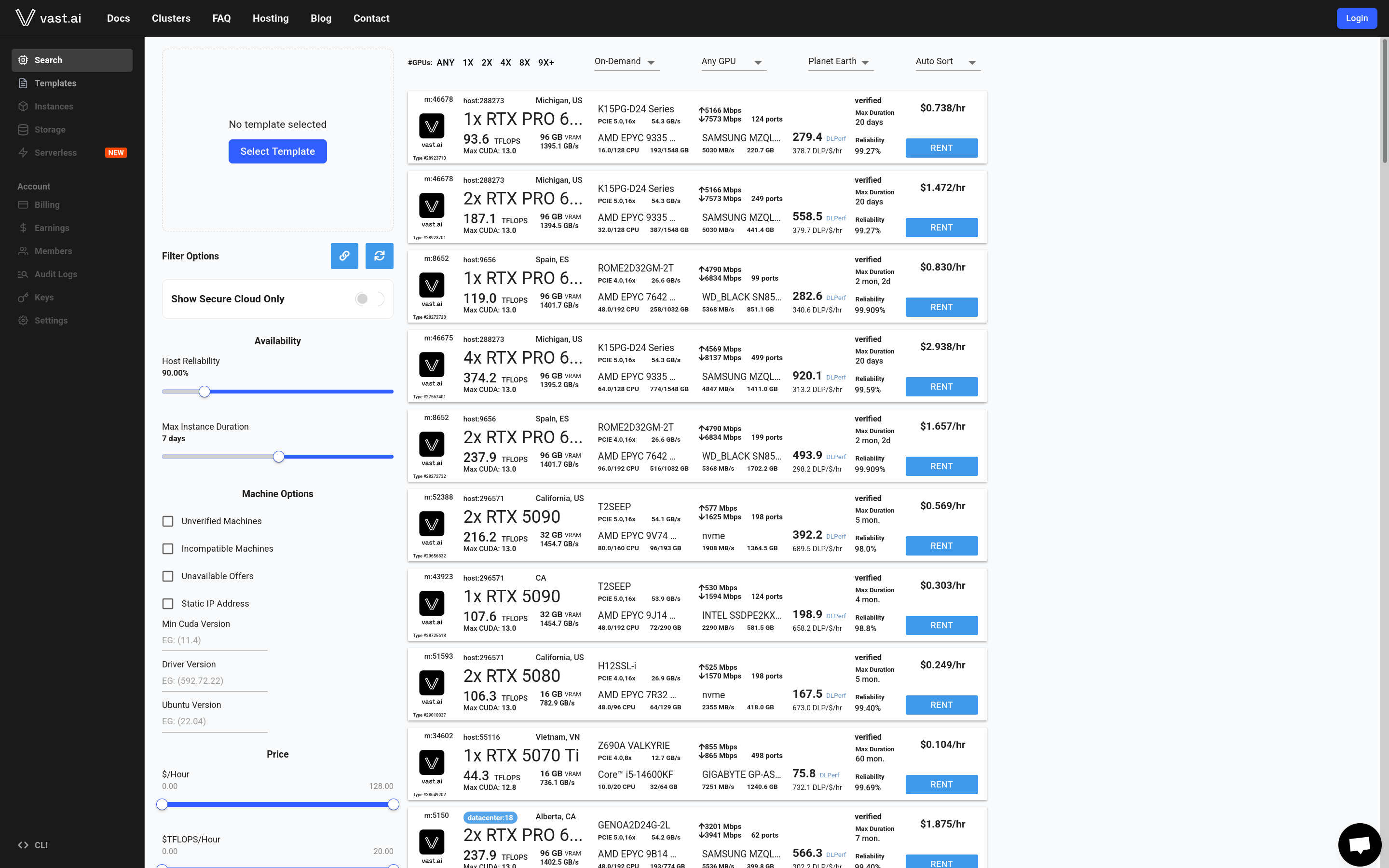
These vendors provide an approachable way for normal people and smaller businesses to get their hands on some GPU compute, however, while it may not be obvious, it is common practice for these vendors to lock you into their service by providing container images which only run on their service, preventing you from switching away, if, for example, one of their competitors now offers a better price.
Of course, this makes sense, but as savvy consumers and nix nerds we weren’t willing to just accept that that had to be the case, which is where we’re delighted to introduce something we’ve been hacking on for months:
An Introduction to nix2gpu
nix2gpu is a simple and easy to compose alternative to using docker (or other container tools) to produce containers ready to plug into all of these GPU markets. By ensuring compatibility with all of them, we give you the maximum amount of choice for where to run your GPU workloads and free you from the shackles of common docker problems.
As
b7r6mentions above, this also has implications for any business premised on efficient markets for GPU compute
We do this by making heavy use of a number of key components to make generating and customizing your containers as easy as possible:
-
nix2container:
nix2containeris an excellent piece of secret sauce that gives us an instant advantage over traditional methods of defining containers (Dockerfile, etc). The fact that it’s written in Nix means inherently that we get significant composability benefits by being able to combine and compose package sets in completely arbitrary ways. It gives you a vastly superior caching setup since it’s a composable tree of things to get built rather than a series of linear operations you might find in aDockerfile. -
Nimi:
Nimiis our own custom container init system and services manager designed specifically for running nix modular services (read our previous blog post if these words mean nothing to you. Basically, this gives us a way to define services that are completely agnostic to what they run on, replacing both docker compose in your development environment and giving us an easy run target for a PID 1 of our containers. Since we specifically designed it for this task, it is fully capable of replacing the functionality required byTini. -
Home Manager: Home Manager integration allows you to customize a personal developer environment and bring it along with you to any container you want. Take your decked out shell and editor configuration with you anywhere you go!
-
The Nix module system: The nix module system allows us to provide you with a simple and scalable way to define configuration options. You can split your container config up into multiple files, implement reusable logic with functions (unlike JSON, Nix is a capable turing complete programming language), and type check that config at evaluation time.
The intersection of these pieces gives us a piece of software with particularly unique properties. A nix2gpu configuration will have the following advantages:
- Agnostic about where it’s internal services can be run (great for debugging and development).
- Easy to reason about and modular configuration that can be split up
- Run on any GPU market provider out of the box (if it doesn’t, please report this as a bug, we consider it as such).
Putting a service on nix2gpu
In order to put on of your services on nix2gpu, first you’ll need a flake parts repository.
Once you have that, import the flakeModule exposed by the nix2gpu flake like follows:
{  inputs.nixpkgs.url = "github:nixos/nixpkgs?ref=nixos-unstable";  inputs.flake-parts.url = "github:hercules-ci/flake-parts";  inputs.nix2gpu.url = "github:fleek-sh/nix2gpu";
  outputs =    inputs@{      flake-parts,      nixpkgs,      nix2gpu,      ...    }:    flake-parts.lib.mkFlake { inherit inputs; } {      imports = [ nix2gpu.flakeModule ];
      perSystem =        { self', ... }:        {          # You can define multiple `nix2gpu` configurations          # by adding more attributes - the name here          # is used to generate your container's name          nix2gpu."foo" = {
            # This maps directly to `Nimi`'s services configuration            #            # See https://github.com/weyl-ai/nimi            services."my-service" = {
              # Use a modular service that comes from your package's              # `passthru.services` option              #              # See https://nixos.org/manual/nixos/unstable/#modular-services              imports = [ self'.packages.myProgramThatUsesAGPU.services.default ];
              # Program settings defined by the modular services              myProgram = {                port = "8080";              };            };
            # Add some github registries to publish the built config to            registries = [ "ghcr.io/weyl-ai" ];
            # Ports to expose from your container            exposedPorts = {              # The SSH daemon is ran by default so you can ssh into your containers              "22/tcp" = { };
              # The port we're running our service on              "8080/tcp" = { };            };          };        };    };}
This will generate a container called foo as a package output on your flake. Inside this container you’ll fin a lot of useful stuff (enabled by default):
- Your service running atop a
Nimiinstance - Everything you could need for
cudainstalled and ready to go, and with an incredibly easy to change version (simply setcuda.packages = pkgs.cudaPackages_13, for example. - Useful scripts bound to the
passthruattribute of your container. Runnix run .#foo.copyToGithubfor the example above in order to publish it into all of the GitHub registries specified
Putting a home manager config on nix2gpu
nix2gpu also has integration with the home-manager module system, to allow you to bring your dotfiles along with you. If you are a heavy nix user (like us) you likely already have a home manager configuration ready to go, in which case you could put it on a nix2gpu instance with cuda dev tools like so:
{  inputs.nixpkgs.url = "github:nixos/nixpkgs?ref=nixos-unstable";  inputs.flake-parts.url = "github:hercules-ci/flake-parts";  inputs.nix2gpu.url = "github:fleek-sh/nix2gpu";  inputs.baileylu.url = "github:baileylu121/invariant"; # My dotfiles repo (use it if you please)
  outputs =    inputs@{      flake-parts,      nixpkgs,      ...    }:    flake-parts.lib.mkFlake { inherit inputs; } {      imports = [ inputs.nix2gpu.flakeModule ];
      perSystem =        { pkgs... }:        {          nix2gpu."with-home" = {            home = home-manager.lib.homeManagerConfiguration {              inherit pkgs;              modules = [                # Use the default module from my dotfiles                # containing an editor config, shell, etc                baileylu.modules.homeManager.luke
                # The default user for the container is `root`, but most people are very unlikely                # to have a home manager config for the root user lying around somewhere                # Hence, this module adapts                nix2gpu.homeModules.force-root-user              ];            };
            # Add some github registries to publish the built config to            registries = [ "ghcr.io/weyl-ai" ];
            # Ports to expose from your container            exposedPorts = {              # The SSH daemon is ran by default so you can ssh into your containers              "22/tcp" = { };            };          };        };    };}
Conclusion
If you’re tired of maintaining parallel service definitions across NixOS, home-manager, and your dev environments, give Nimi a spin. Start with something simple - maybe that Postgres instance you spin up for local development, and see how it feels to have one definition that works everywhere.
We’d love to hear what you build with it. Since the modular services spec is still experimental, expect Nimi to evolve alongside it. If you’re ready to try it, the quickest path is the Nimi docs.
— baileylu & b7r6